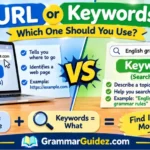
“URL or Keywords: A URL is the web address of a specific page or website, while keywords are the words or phrases people use to search for information online. URLs help users visit pages, while keywords help search engines understand and find relevant “content”.
You want to find a page online. You might type a few words into a search engine, or you might enter a web address directly into your browser. Both actions can help you reach information, but they use different things: keywords and URLs.
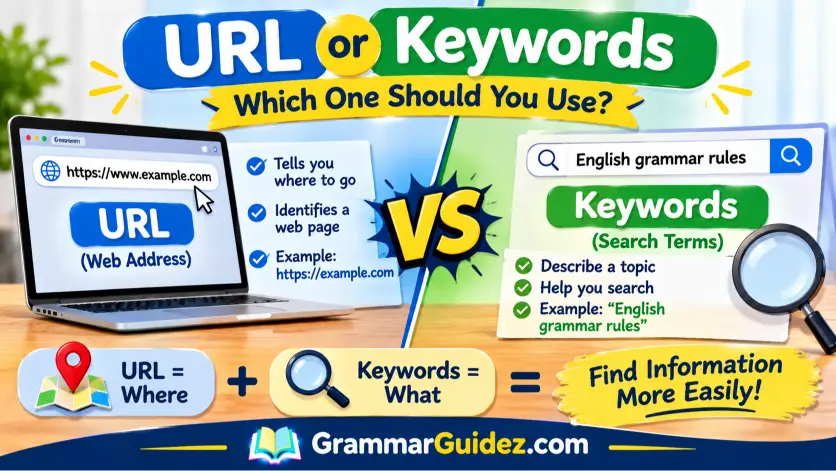
A URL is the address of a page or other resource on the internet. Keywords are words or phrases that describe a topic or help someone search for information. For example, https://example.com/grammar/ is a URL. The phrase “English grammar rules” is a set of keywords someone might search.
These terms are often used together, especially when people discuss websites and search engine optimization (SEO). However, they do not mean the same thing. A URL tells a browser where to go, while keywords help describe what a person is looking for or what a page is about.
This guide explains the meaning of URL and keywords, shows how they differ, and gives simple examples to help you use each term correctly.
Read More: Develop or Develope: Which Spelling Is Correct?
Quick Answer: URL or Keywords?
A URL is a web address that identifies where an online page or resource can be found. Keywords are words or phrases that describe a topic or are used to search for information.
- URL: https://example.com/blog/
- Keywords: “healthy breakfast ideas”
- Main difference: A URL points to a location; keywords describe a topic or search need.
What Is a URL?
URL stands for Uniform Resource Locator. It is the address used to locate a resource on the internet, such as a webpage, image, or video. A URL is often called a web address or link.
For example:
When you enter this address in a browser, the browser uses it to find and open the requested page.
A URL can contain several parts. In a simple web address:
- https is the scheme, which tells the browser how to connect.
- www.example.com is the domain name.
- /about/ is the path that points to a particular page or section.
Not every URL contains all possible parts. Some URLs include extra information, such as query parameters, that help a website show or process specific content.
Examples of URLs
- https://www.example.com/
- https://www.example.com/contact/
- https://www.example.com/blog/grammar-tips/
Each example is a web address. It can point to a different page or location on a website.
What Are Keywords?
A keyword is a word or phrase that describes a topic or helps someone find information. When you use a search engine, you can enter keywords to tell it what you want to learn about.
For example, someone who wants to learn about grammar might search for:
- English grammar
- grammar rules for beginners
- how to use commas
These are keywords or keyword phrases. They describe the subject the person wants to explore.
A keyword does not have to be just one word. It can be a phrase made of several words. For example, “best books for learning English” is a keyword phrase.
Examples of Keywords
| Topic | Example keyword |
| Grammar | English grammar rules |
| Food | easy breakfast recipes |
| Travel | places to visit in Lahore |
| Technology | how to protect a phone |
| Education | beginner English lessons |
Keywords can help people search for information. They can also help writers describe the main subject of a webpage.
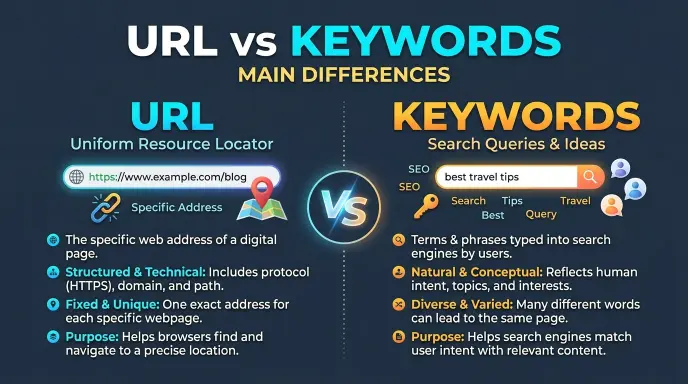
URL vs Keywords: Main Differences
| Feature | URL | Keywords |
| Meaning | An internet address | Words or phrases about a topic |
| Main purpose | Helps locate a specific resource | Helps describe or search for information |
| Example | https://example.com/contact/ | “contact page” |
| Used in | Browser address bar, links, website structure | Search boxes, content, SEO planning |
| Usually points to one page? | Yes, it identifies a resource or location | No, the same keywords can match many pages |
| Can contain multiple words? | Yes | Yes |
The key difference is simple: a URL tells you where a resource is, while keywords tell you what the resource or search is about.
URL or Keywords: How Do They Work Together?
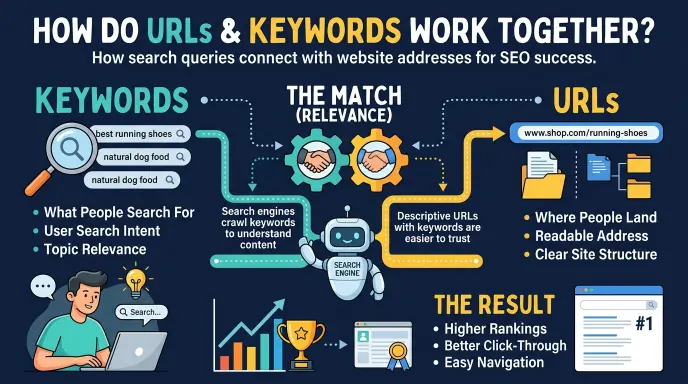
URLs and keywords often work together, but they have different jobs.
Imagine you want to learn about English punctuation. You type “English punctuation rules” into a search engine. Those words are your search terms.
The search engine then shows pages that may answer your question. Each result has a URL. When you click a result, the browser uses that URL to open the page.
So the process may look like this:
- You enter keywords into a search engine.
- The search engine finds pages related to those words.
- You choose a result.
- The browser opens the page using its URL.
Keywords help you find relevant pages. URLs help you reach the pages you choose.
Is a URL the Same as a Link?
People often use the words “URL” and “link” in similar ways, but they are not always identical.
A URL is the address of a resource. A link is a clickable element that takes you to a URL or another location. For example, the words “Visit our homepage” may be a link. The URL behind that link could be https://example.com/.
A URL can be written as plain text, and it may also be used as the destination of a clickable link. A link usually gives you something to click or tap.
Are Keywords the Same as Search Queries?
Keywords and search queries are closely related, but they can have different meanings in SEO.
A search query is the actual wording a person enters into a search engine. A keyword is often the topic or phrase that a website owner or marketer chooses to target. Search queries may include extra words, different wording, or spelling mistakes.
For example:
- Target keyword: “beginner grammar lessons”
- Possible search query: “What are good grammar lessons for beginners?”
The wording is different, but both may express a similar need.
How Are Keywords Used in SEO?
SEO means search engine optimization. It involves making webpages useful and understandable for people and search engines.
Keywords can help a writer understand what a page should cover. A page about beginner grammar lessons may naturally use related phrases such as “basic grammar,” “English sentence rules,” and “grammar practice.”
Good keyword use should support the reader. Adding the same phrase repeatedly or inserting unrelated keywords can make a page difficult to read. Search engines and readers benefit from clear, useful content that matches the topic.
Where can keywords appear?
Keywords may appear naturally in:
- The page title
- The main heading
- The introduction
- Helpful subheadings
- The body text
- Image descriptions, when relevant
A page should not force keywords into every sentence. Use them where they help explain the subject.
Should You Put Keywords in a URL?
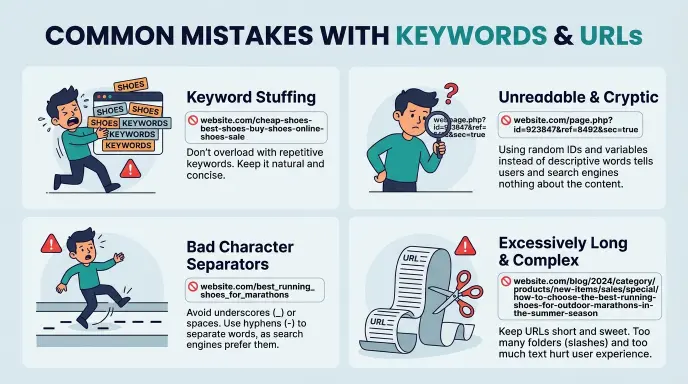
A clear URL can help people understand what a page is about. Google recommends using readable, descriptive words and separating words with hyphens when possible. It also advises keeping URL structures simple and avoiding unnecessary parameters.
For example:
Clear URL: https://example.com/grammar/commas/
Less clear URL: https://example.com/page?id=4827
The first address gives readers a clue about the page topic. However, a URL does not need to contain every keyword related to the page.
Choose a short, meaningful address that accurately describes the content. Do not make a URL long just to fit extra search terms.
Common Mistakes
Mistake 1: Calling keywords a web address
Keywords are words or phrases about a topic. They are not the address of a specific page.
Mistake 2: Calling every URL a keyword
A URL is an address. It may contain descriptive words, but that does not make the full URL a keyword.
Mistake 3: Thinking one keyword leads to only one page
Many pages can match the same keyword. A search engine may show several results for one search.
Mistake 4: Using a URL when you mean a search phrase
If you want someone to search for a topic, give them keywords. If you want them to open a particular page, share its URL.
Mistake 5: Adding too many keywords to a URL
A long address filled with extra words can be hard to read. Use a short, descriptive URL that matches the page.
Simple Memory Tip
Remember this:
- URL = where
- Keywords = what
A URL tells you where to find a webpage. Keywords tell you what the page or search is about.
For example, “easy grammar lessons” is what you are looking for. A URL such as https://example.com/grammar-lessons/ is where you can find a page about it.
URL or Keywords: A URL is the web address of a specific page or website, while keywords are the words or phrases people use to search for information online. URLs help users visit pages, while keywords help search engines understand and find relevant content.
Fill in the Blanks
- URL stands for Uniform Resource __________.
- A URL is the address of an online page or __________.
- Keywords are words or phrases that describe a __________.
- A search engine uses keywords to help find relevant __________.
- A URL tells you where; keywords tell you __________.
Answers
- Locator
- Resource
- Topic
- Pages
- What
Mini Quiz: URL or Keywords?
1. What does a URL identify?
A. A topic only
B. The location of an online resource
C. A spelling rule
D. A search engine’s logo
Answer: B. The location of an online resource
2. Which option is a keyword phrase?
A. https://example.com/
B. “beginner English lessons”
C. A browser address bar
D. A website link button
Answer: B. “beginner English lessons”
3. Where would you usually enter keywords?
A. In a search engine’s search box
B. In a printed book
C. Only in a website footer
D. In a computer’s power button
Answer: A. In a search engine’s search box
4. What is the main difference between a URL and keywords?
A. They mean exactly the same thing.
B. A URL is an address; keywords describe a topic or search.
C. Keywords always open a webpage directly.
D. A URL is always one word.
Answer: B. A URL is an address; keywords describe a topic or search.
5. Which URL is more descriptive?
A. https://example.com/page?id=4827
B. https://example.com/grammar/commas/
C. “grammar commas”
D. “how to use commas”
Answer: B. https://example.com/grammar/commas/
FAQs
1. What is the difference between a URL and keywords?
A URL is the internet address of a page or resource. Keywords are words or phrases that describe a topic or help someone search for information.
2. Is a URL a keyword?
No. A URL is a web address. It may contain words that describe a page, but its main purpose is to identify the page’s location.
3. Can keywords be used in a URL?
Yes. A URL can include descriptive words related to the page topic. A short, readable URL can help people understand what the page is about.
4. What is an example of a URL?
https://example.com/about/ is an example of a URL. It points to a page on a website.
5. What is an example of a keyword?
“English grammar rules” is an example of a keyword phrase. Someone might type it into a search engine to find lessons or explanations.
6. Are keywords and search terms the same?
They are often used in similar ways. In SEO, a keyword may be the phrase a website targets, while a search query is the exact wording a person types.
7. Where do I enter a URL?
You can enter a URL into the address bar at the top of a web browser. Press Enter or Go to open the address.
8. Where do I enter keywords?
You usually enter keywords into a search engine’s search box. The search engine then shows pages related to your words.
9. Do keywords need to appear in every URL?
No. A URL should be clear and relevant to its page. It does not need to include every keyword connected to the topic.
Conclusion
URL and keywords are connected, but they have different meanings. A URL is the address that identifies where an online page or resource can be found. Keywords are words or phrases that describe a subject or help people search for information.
For example, “English grammar rules” can be a keyword phrase. A web address such as https://example.com/grammar/ can lead to a page about that topic.
When you want someone to open a specific page, share its URL. When you want to describe a subject or search for information, use keywords. Remember the simple rule: URL means where; keywords mean what.
Read More: Peeking or Peaking: Which Word Is Correct?

I am Elliot Hartwell, an English language writer and the author at GrammarGuidez.com. For the 6 years I have been working with English grammar, vocabulary, spelling and everyday language usage with a focus on making confusing topics easier to understand.
I started GrammarGuidez.com with a goal: to give readers clear and practical answers to common English questions. English can sometimes be confusing especially when two words look or sound similar but have meanings or uses. I enjoy breaking down these differences in a way that’s simple and easy to remember.
I believe learning English should feel simple not overwhelming. My goal is to make every article on GrammarGuidez.com useful, for students, writers, bloggers, teachers and anyone who wants to communicate clearly in English.